Eine Plattform für dein Finanz-Reporting.
Von DATEV bis KI, eine Datenbasis für Reports in Fyvel, Excel, Google Sheets und MCP.
Unternehmen von Mittelstand bis Startup vertrauen Fyvel







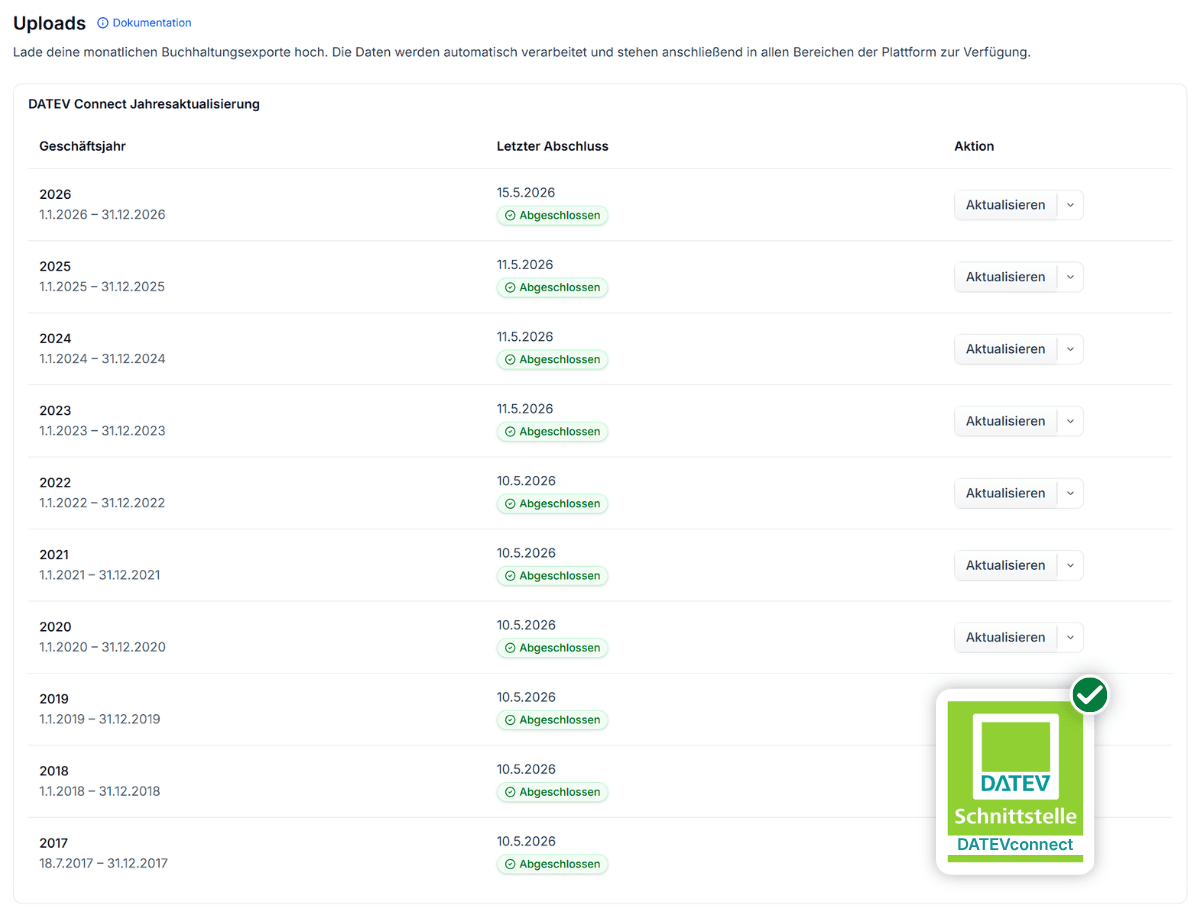
DATEV-Daten kommen rein. Sauber. Strukturiert. Ohne Magie.

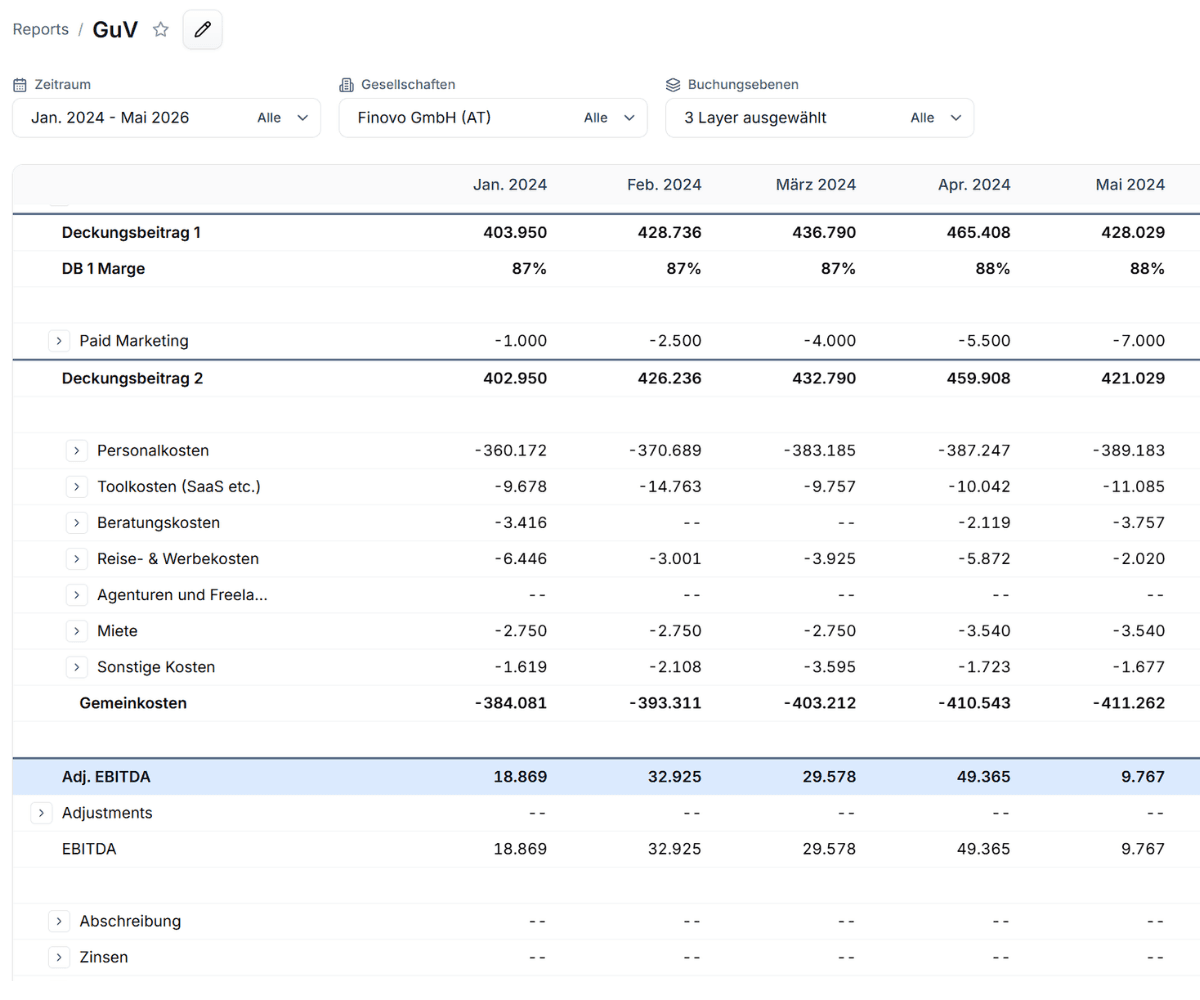
GuV, Bilanz und Cashflow, aus einer Datenbasis, ohne Excel-Klimmzüge.

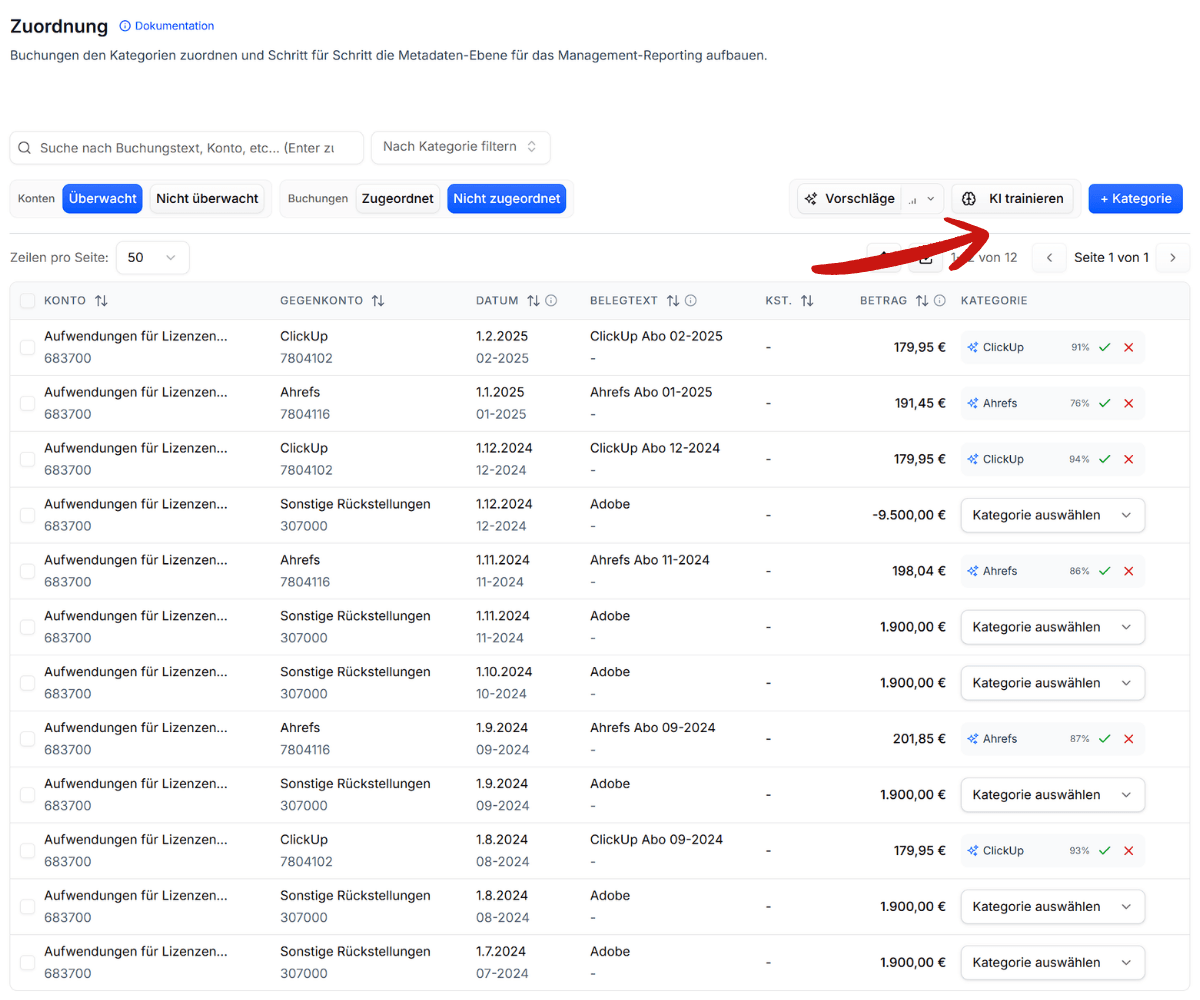
Buchungen kategorisieren, mit Vorschlägen, die mit dir lernen.

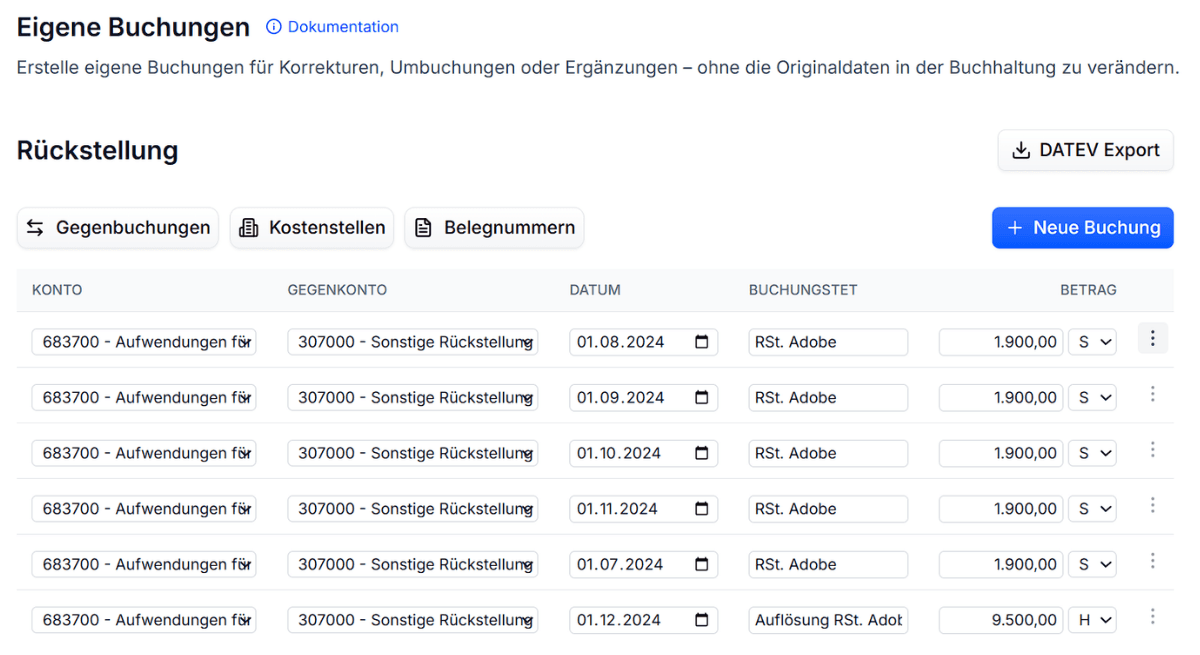
Adjustments & Rückstellungen ohne Umweg

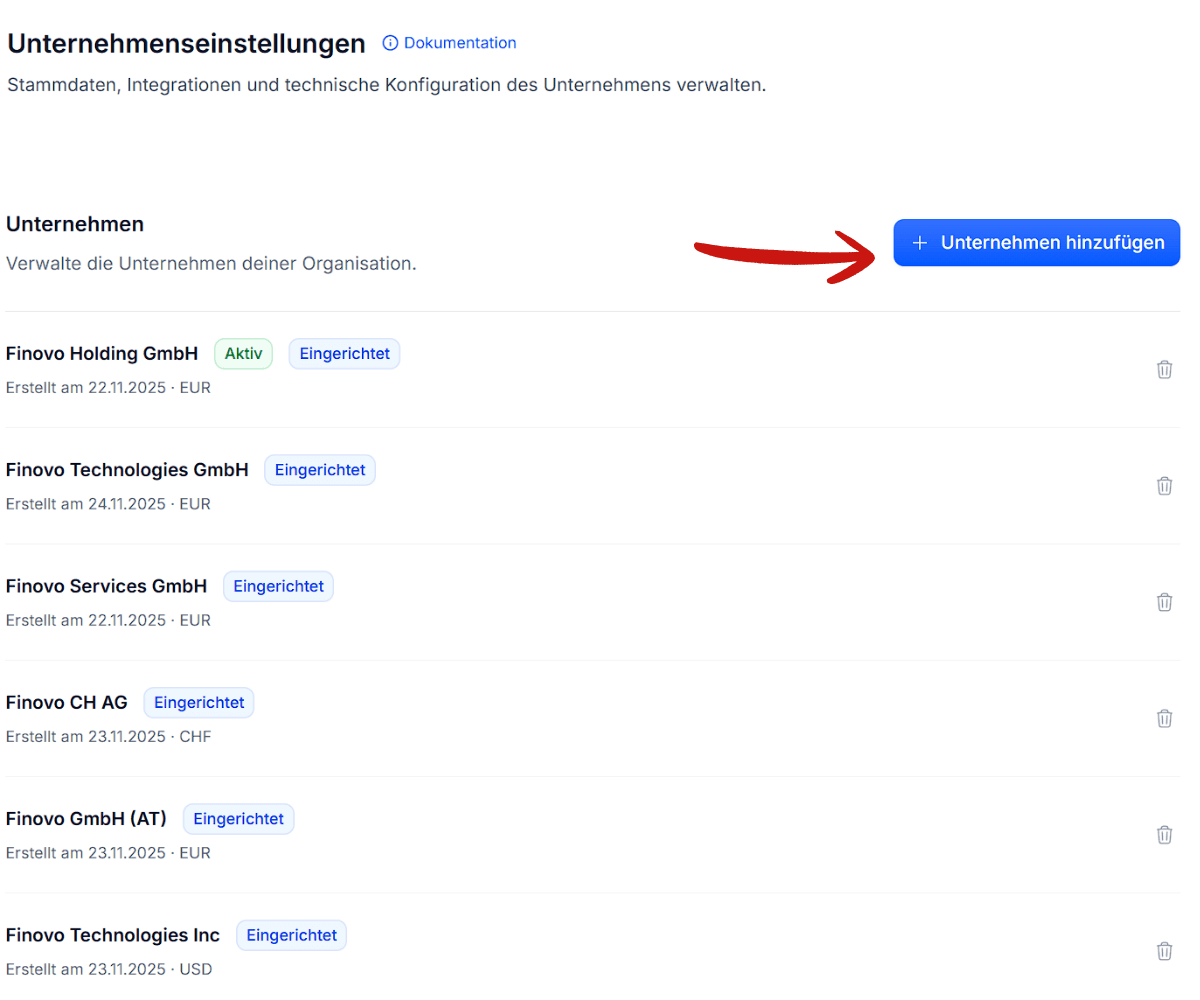
Mehrere Gesellschaften, ein Blick.

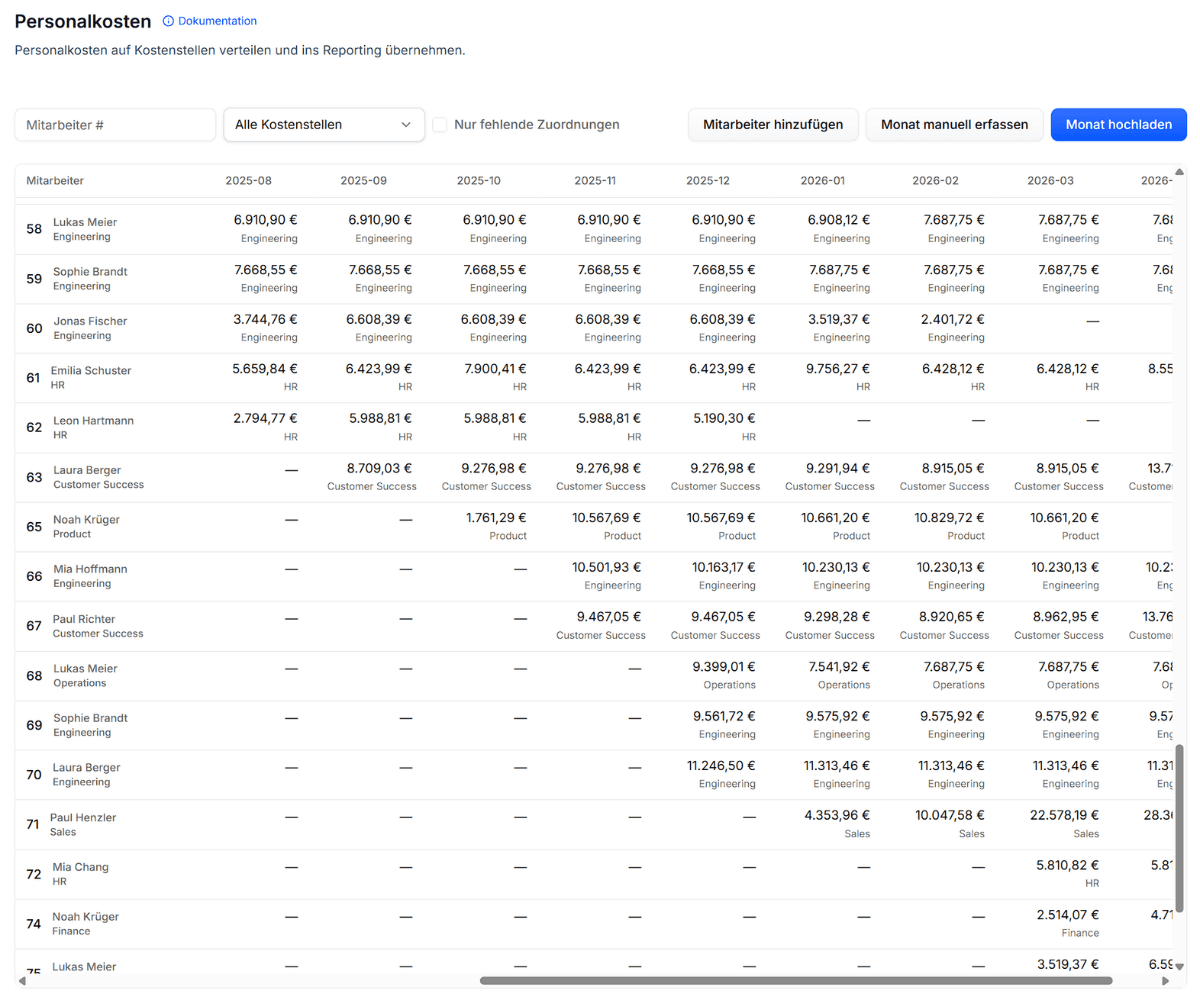
Personalkosten dort sehen, wo sie entstehen.

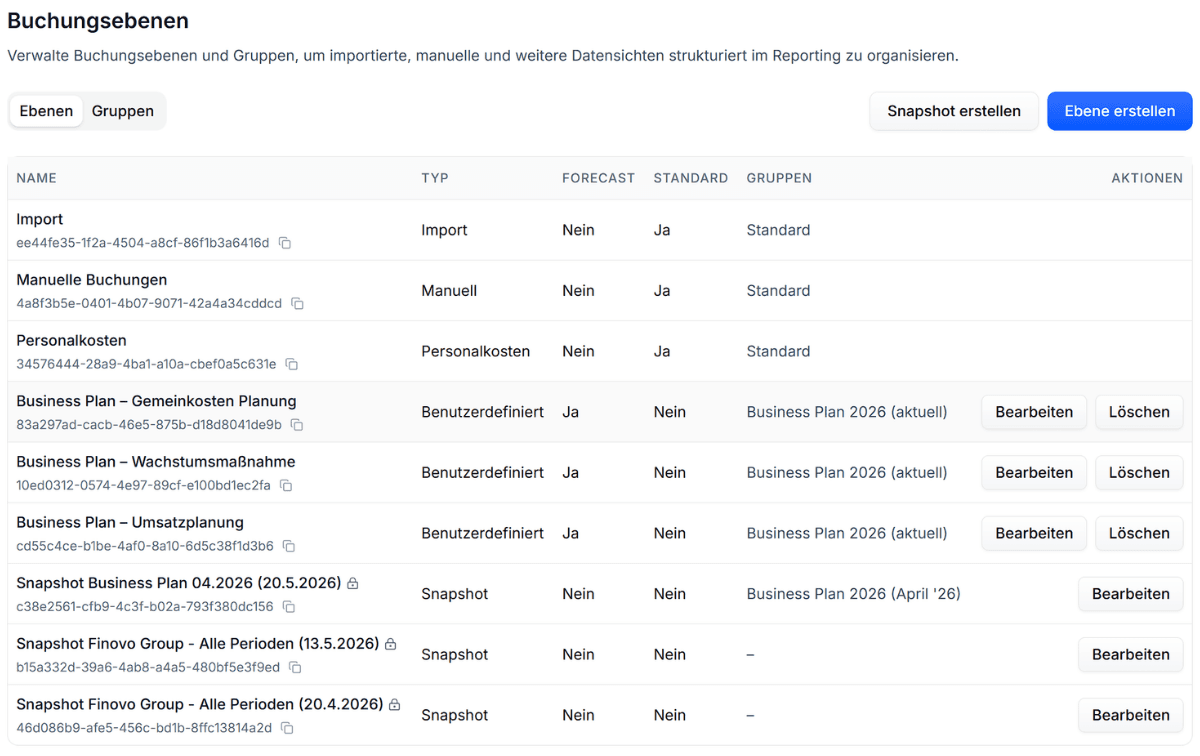
Ist, Plan, Forecast, Snapshots, sauber getrennt, jederzeit kombinierbar.

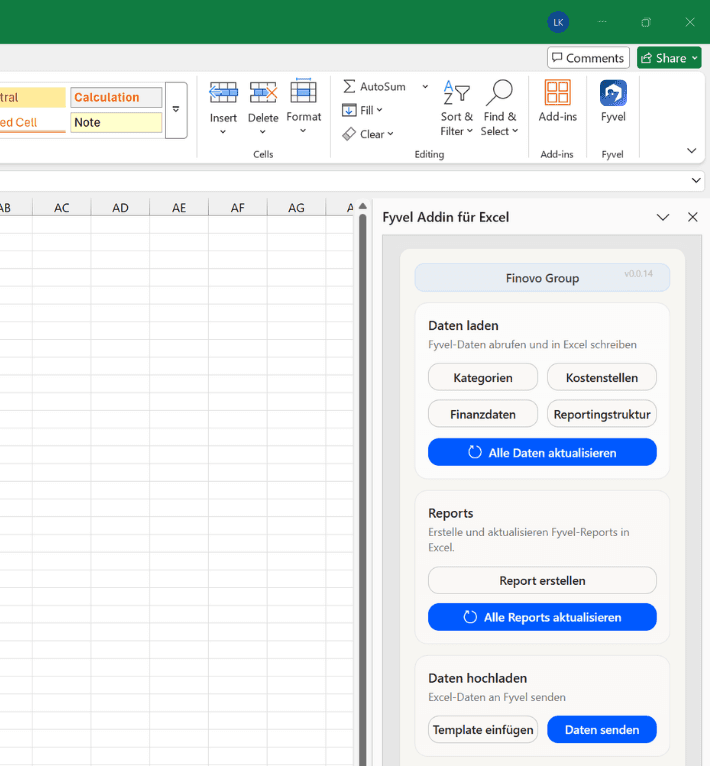
Deine Reports in Excel und Google Sheets, live verbunden.

Verbinde Cursor, Claude Desktop & Co. mit deinen Finanzdaten.
fyvel-onboarding.md
Ersteinrichtung
---
name: fyvel-onboarding
description: >-
  Runs Fyvel company onboarding via MCP: minimal P&L intake, then execute
  (reporting structure, categories, report) with sensible defaults – not long
  questionnaires. Use for Ersteinrichtung or first management P&L from DATEV.
disable-model-invocation: true
---

# Fyvel Company Onboarding

Always read tool JSON schemas before calling. **Deliver output using Phase 14 – keep it brief.** Default to **German** unless the user writes in English.

For agent tone and brevity, also follow [SYSTEM-PROMPT-onboarding.de.md](./SYSTEM-PROMPT-onboarding.de.md) when this skill is used as a system prompt.

**Initial period accruals (Abgrenzung) during onboarding:** Phase 11 below – stay in this skill.

**Ongoing monthly closes** after go-live: [fyvel-monthly-closing.md](./fyvel-monthly-closing.md).

---

## Agent behavior – execute, don't interview

**Default mode: do the work via MCP.** The user onboarded to get a configured company, not a workshop deck.

| Do | Don't |
|----|--------|
| `list_companies` → immediately load data and start Phase 0 | Open with a multi-page questionnaire |
| Implement with **sensible defaults** when info is missing | Ask SKR03/04 if accounts/import already show it |
| Treat **screenshot / pasted P&L list** as **approved blueprint** → Phase 2+ without re-confirm | Re-ask what the screenshot already shows |
| After blueprint: **create RS, map accounts, build report** in the same session | Write „So legst du es in Fyvel an…“ click guides |
| Progress updates: **1–3 lines** between MCP batches | Long prose, legenda tables, numbered essay sections |
| One **❓ block** only for true blockers (max 2 bullets) | „Offene Punkte zur Bestätigung“ with 4+ questions |

### When to ask (rare)

Ask **only** if execution would be **wrong or irreversible** and you cannot infer from data + screenshot:

- User gave **no** P&L shape at all → **one** short question: *„Wie soll die P&L aussehen – Screenshot, Stichpunkte oder soll ich aus den Buchungen vorschlagen?“*
- **Contradictory** design (e.g. same line as revenue and cost with no split rule)
- **Scope fork**: user might want full onboarding vs. only Toolkosten – only if they never said which

### When **not** to ask – use defaults and note in ⚠️

| Situation | Default action |
|-----------|----------------|
| User: *„so soll der Report aussehen“* + image | Blueprint = image → **implement** |
| User: *„mach Umsetzung“ / „wahrscheinlichsten Fall“* | Standard consulting P&L from blueprint; no more questions |
| SKR03 vs SKR04 | Read from import / account patterns; if unclear, pick what matches `list_accounts` |
| Personal Consulting = Umsatz vs Kosten | **Kosten** (DB I): Personalkosten RS + KS Consulting – unless screenshot labels them as revenue |
| Gemeinkosten | **Calculated row** in report (sum OPEX), **not** an RS line |
| DB II | Only Paid Marketing subtracted – rest marketing in Reise- & Werbekosten |
| Kostenstellen | Create Consulting / Gemeinkosten / Marketing when blueprint has personnel splits |
| User: *Abgrenzung / periodengerecht / Rückstellungen / glattziehen* | **Phase 11** – drilldown → **buchen**, nicht diskutieren ob nötig |
| User: *Mapping durch / Onboarding abschließen / Verifikation* | Phase **11 → 13** in derselben Session, dann Phase 14 |
| User offers „Monatsabschluss“ but context is onboarding | **Nicht** auf fyvel-monthly-closing wechseln – Phase 11 hier |

### Response length (hard)

- **Status between phases:** ≤3 sentences or ≤5 bullets.
- **After a phase completes:** use Phase 14 template only.
- **Never in user chat:** full blueprint tables, SKR mapping essays, „Checkliste für dich in Fyvel“, duplicate legend explaining Daten vs Berechnet (once in skill is enough).
- **Forbidden:** *„Schreib mir als Nächstes…“*, *„Im nächsten Schritt können wir…“* without having executed the current step first.

---

## Prerequisites

1. MCP credentials configured; first import uploaded.
2. `list_companies` → `companyUuid` – **first action**, not after a survey.
3. Infer scope from user message; only ask if genuinely ambiguous.

**Execute via MCP** once a P&L shape exists (screenshot, list, or user-approved one-liner). Manual-only instructions are a failure mode.

**Without explicit permission:** do not set `isTracked` beyond agreed scope – but **do** create RS, map accounts, build the report, and **book Phase 11 accruals** when the user scoped onboarding completion or asked for period adjustment / Abgrenzung.

---

## Core rules

### P&L first – reporting structure follows

The **target P&L is client-specific** – but obtaining it should be **fast**, not a workshop.

1. Get the shape: screenshot, pasted list, or **one** question if nothing provided.
2. **Screenshot / list = confirmed blueprint** – do not ask again unless ambiguous.
3. **Derive reporting sections** from that design and **implement immediately**.

A reference layout in this skill is **fallback only** when the user delegates *„mach den wahrscheinlichsten Fall“*.

### Reportingstruktur ≠ Report

| Layer | Contains | Must NOT contain |
|-------|----------|------------------|
| **Reportingstruktur** | Real account building blocks; category-assignable P&L lines | Summen, Zwischensummen, Deckungsbeitrag, EBITDA, „Gemeinkosten“ als Summe, Umsatz gesamt |
| **Report (P&L)** | Data rows, calculated rows (DB I/II, EBITDA, Ergebnis), filters | – |

One RS line can be used in multiple report lines by filtering for cost centers. For example there might be one line for **Personalkosten** or **Software**. These lines get broken down in Overhead and Marketing Cost by applying a **cost center** filter on these BS lines.

### Categories

- Follow **economic substance** (wirtschaftliche Logik der P&L), **not** the FiBu account alone.
- Example: Adobe on 660000 Werbekosten → category still **Tool**; Google SEA / Google Ads on 683700 → category **Google Ads** (Paid Marketing RS), not „Toolkosten“.
- **Categories = drilldown dimension** inside a report row (Slack, Notion, Google Ads) – **not** a 1:1 copy of the reporting-section name.

### „Kategorisieren“ ≠ tracked setzen

`isTracked` only puts bookings in **Zuordnen**. Categorization means **Phase 5 → 6**:

1. Analyze bookings (especially **Gegenkonto** / offset account).
2. Create **multiple** categories (vendor, tool, or economic type).
3. Map each booking to the **best-fit** category.

**Never** satisfy „kategorisieren“ by creating one catch-all category and mapping everything there.

### Forbidden category patterns

Do **not** create categories that mirror the RS line or mean „everything on this account“:

| Forbidden | Why |
|-----------|-----|
| „Toolkosten gesamt“, „Software gesamt“ | No drilldown; useless in reports |
| „Werbekosten gesamt“, „Paid Marketing gesamt“ | Same |
| Any `{Reportingstruktur-Name} gesamt` | Same |
| One category for 50+ bookings with 5+ distinct Gegenkonten | Must split by vendor/substance |

**Allowed aggregates:** „Sonstige Software“, „Sonstige Tools“ – only for **small** recurring items (<€100/mo) **after** named tools have their own categories.

### User phrasing

| User says | Means |
|-----------|--------|
| „Toolkosten kategorisieren“ | Granular categories for bookings on tool accounts – **per vendor/tool**, plus optional „Sonstige …“ |
| „alle Kosten unter Toolkosten kategorisieren“ | **Every** tracked tool booking gets a category – but **not** the same category for all |
| „Paid Marketing mappen“ | Google Ads, Meta Ads, … – not one „Paid Marketing gesamt“ |

If scope is only Toolkosten: still map Google/Meta on 683700 to **Paid Marketing categories** (economic substance), not under a tool bucket.

### Mapping gate

For every **tracked** account: `list_mapping_transactions { mapped: "unmapped" }` → **0** before sign-off. Nothing may remain unmapped in Zuordnen.

### Tracking (`isTracked`)

Set **only** when the user explicitly wants those lines in the mapping workflow. Do not enable tracking while still wiring reporting structure.

### Discovery

Discover accounts, sections, and categories via MCP.

Call `list_layers { companyUuid }` first, then choose the tool for the intended mode:

- **Standard:** `resolve_report` / `resolve_report_row_drilldown` with `selectedLayerUuids` or `selectedLayerGroupUuids`
- **Rolling Forecast:** `resolve_rolling_forecast` / `resolve_rolling_forecast_drilldown` with actual and forecast `periodSlices`
- **Compare:** `compare_report` / `compare_report_row_drilldown` with `compareSides`; returns sideA − sideB

Each tool accepts only its mode-specific fields. Standard mode requires a layer or layer group.

**Analytics cache retry:** If a report resolver errors with *"Report data is still being refreshed…"*, wait a few seconds and retry the same call for up to one minute. An empty drilldown breakdown (`rows: []`) is valid when the row has no matching categories or accounts.

---

## Workflow

```
0  Setup – list_companies + load data (immediate)
1  P&L blueprint – from user input OR one short ask
2  Create GuV reporting sections + map accounts (MCP)
3  Balance-sheet reporting structure
4  Tracking scope (isTracked – if in scope)
5  Review bookings → derive categories
6  Create categories + map bookings
7  Category sanity check (P&L logic)
8  Refine categories (recurring > €100/month)
9  Cost centers (if blueprint needs them)
10 P&L report build (MCP)
11 Period accruals (Abgrenzung) – onboarding sign-off
12 Final mapping (unmapped = 0)
13 Verification
14 Brief output
```

---

## Phase 0 – Setup

```
- [ ] list_companies → companyUuid
- [ ] list_accounts { companyUuid }
- [ ] list_reporting_sections { profit_loss, balance_sheet }
- [ ] list_cost_centers
- [ ] list_layers → note default layer UUIDs for later resolve_report
- [ ] Sample: list_mapping_transactions or list_account_transactions on largest P&L accounts
```

Capture briefly: booking count, chart (SKR03/04), which accounts carry volume, existing cost-center codes on bookings, date range.

---

## Phase 1 – P&L blueprint (minimal)

**Goal:** know the report row list – not hold a discovery workshop.

### Path A – User gave screenshot, list, or „so soll der Report aussehen“

1. Parse rows top → bottom (data vs calculated).
2. **Do not ask confirmation questions** the image already answers.
3. Optionally post **≤8-row compact list** (name + Daten/Berechnet only) – then **start Phase 0→2 in the same turn** if MCP is available.

### Path B – User said „onboarden“ but no P&L shape yet

Run Phase 0 first, then **one** message:

**DE:** *„Schick mir ein Screenshot oder Stichpunkte eurer Ziel-P&L – oder soll ich aus euren Buchungen einen Vorschlag bauen und direkt umsetzen?“*

If they choose infer → propose **≤10 rows** in one short list and **implement** unless they object.

### Path C – User said „Umsetzung“ / „wahrscheinlichsten Fall“

Use blueprint from screenshot or example below; **no further questions**.

### RS mapping rules (internal – do not paste as user essay)

| P&L need | RS approach |
|----------|-------------|
| Single cost/revenue block | One RS, map accounts |
| Same accounts, multiple report rows | One RS + **cost-center filters** in report |
| Vendor/tool split in report | One RS + **categories** (Phase 5–6) |
| DB vs OPEX same account class | Separate RS lines per blueprint |
| DB, EBITDA, Gemeinkosten sum, Ergebnis | **Report only** – never RS |

**Gate to Phase 2:** blueprint exists – confirmation is **implicit** from screenshot or explicit go-ahead.

### Example layout (fallback only)

Use when user delegates *„wahrscheinlichsten Fall“* and gave no other shape:

```
Umsatz
  Personal Consulting          ← Personalkosten, KS Consulting
  Freelancer (DB)              ← Direkte Freelancerkosten RS
→ Deckungsbeitrag 1
  Paid Marketing
→ Deckungsbeitrag 2
  Personalkosten / Toolkosten / … OPEX …
  Gemeinkosten                 ← Personalkosten, KS Gemeinkosten (report filter, not RS sum)
→ EBITDA
  Abschreibung / Zinsen / Steuern
→ Vorläufiges Ergebnis
```

Match **user’s** design when it differs.

---

## Phase 2 – Create P&L reporting structure from the blueprint

Build sections from **Phase 1 blueprint**, not from a fixed template.

```
// List sections to create = data rows from blueprint that need RS (not calculated rows)
bulk_create_reporting_sections { accountType: "profit_loss", sections: [...] }
update_account { accountUuid, reportingSectionUuid }  // map every existing GuV account
change_reporting_section / change_reporting_section_order as needed
delete_reporting_section  // mistaken sum lines only
```

### Derivation checklist

For each confirmed P&L **data row**:

1. Create an RS line with the **user’s label** (or agreed German/English name).
2. Set `isCategoryAssignable`: **yes** if row will use categories in Zuordnen; **no** for personnel (KS), rent, AfA, etc. Default is **yes** for most lines. For depreciation, taxes and personnel cost default is **no**
3. Map **existing accounts** from `list_accounts` to the RS line; leave empty if no accounts yet.
4. If two report rows share the same accounts (personnel splits), use **one RS** – filters go in Phase 10.

### Patterns (apply when the user’s blueprint needs them)

| Pattern | When user’s P&L needs it |
|---------|--------------------------|
| Personnel + cost centers | One RS „Personalkosten“; report rows filter by KS |
| Freelancer DB vs. OPEX | Two RS lines; map 590xxx vs. 630xxx per user rules |
| Marketing DB vs. Werbekosten OPEX | Separate RS or categories – confirm with user in Phase 1 |
| Placeholder RS (Paid Marketing, AfA) | Empty until accounts exist – ok if blueprint includes the row |

**Anti-pattern:** creating the full „standard“ RS list from a table below without Phase 1 alignment.

Map **every existing GuV account** to exactly one section; unassigned accounts block clean reporting.

---

## Phase 3 – Balance-sheet reporting structure

```
bulk_create_reporting_sections { accountType: "balance_sheet", sections: [...] }
update_account { accountUuid, reportingSectionUuid }
```

**~10–12 lines, no sums:**

Aktiva: Sachanlagen, Finanzanlagen, Vorräte, Forderungen, Sonstige VGG, Kasse und Bank
Passiva: Eigenkapital, Rückstellungen, VKi, Verbindlichkeiten LuL, Sonstige Verbindlichkeiten

Map existing balance-sheet accounts; empty lines remain as placeholders.

If an other provision account does not exist, create **Sonstige Rückstellungen** (SKR03 **970** at 4 digit account numbers (yes, onle 3 digits in the account); SKR04 **3070** at 4 digit account numbers) under **Rückstellungen**.

---

## Phase 4 – Tracking scope

Only after user confirms which RS lines to categorize:

```
update_account { accountUuid, isTracked: true }
```

**Typical tracked lines:** Toolkosten, Werbekosten/Paid Marketing, Freelancer lines, Beratungskosten, Sonstige Kosten, Office rent.

**Do not track:** Personalkosten (cost centers), Bilanz, empty placeholder sections.

**Stopping after Phase 4 is wrong** when the user asked to **kategorisieren** – continue to Phase 5–6 in the same session.

---

## Phase 5 – Review bookings → derive categories

**Order is mandatory: analyze first, create categories second.** Skipping analysis and creating one „gesamt“ category is always wrong.

```
list_mapping_transactions { tracked: "tracked", pageSize: 500, sortBy: "offset_account_account_name" }
list_mapping_transactions { tracked: "tracked", pageSize: 500, sortBy: "amount" }
list_account_transactions { accountNumber, periodFrom, periodTo }  // per tracked account
```

Group by **Gegenkonto / offset account** and posting text. Build a category list like:

| Gegenkonto / Muster | Category name | RS (economic home) |
|---------------------|---------------|------------------|
| Google Ireland | Google Ads | Paid Marketing |
| Slack Technologies | Slack | Toolkosten |
| HubSpot | HubSpot | Toolkosten |
| … | … | … |
| diverse <€100/mo | Sonstige Software | Toolkosten |

Note:

- Recurring costs vs. one-offs
- Mis-posted accounts (Google on 683700 → **Paid Marketing** category, not Tool)
- **Minimum bar:** if ≥3 distinct Gegenkonten with material spend → ≥3 named categories before any „Sonstige …“ bucket

Do **not** ask the user to name every category if the data is clear – **implement** from Gegenkonten. Only ask if a booking is truly ambiguous.

---

## Phase 6 – Create categories + map

```
bulk_create_categories { companyUuid, categories: [{ name, reportingSectionUuid }] }  // economic home – may differ from FiBu account
set_booking_categories { companyUuid, groups: [{ bookingUuids, categoryUuid }] }
```

**Rules:**

1. Create **one category per named vendor/tool** (from Phase 5 table) – map by Gegenkonto in batches.
2. **`reportingSectionUuid`** = where it belongs in the **P&L logic** (Google Ads → Paid Marketing RS even if booked on 683700).
3. After mapping, verify: `list_categories` should show **many** categories with bookings – not one blob with 100+.
4. `list_mapping_transactions { mapped: "unmapped" }` → 0.

**Sanity check before sign-off:**

```
list_mapping_transactions { mapped: "mapped", pageSize: 25 }  // spot-check variety
```

If one category holds >80% of bookings and >5 distinct Gegenkonten → **split and re-map**.

---

## Phase 7 – Category sanity check

Re-read categories against **Phase 1 P&L logic**, not FiBu labels.

| Often wrong | Fix |
|-------------|-----|
| Tool booked on Werbekosten account | Category = tool; account mapping may stay until FiBu fixes |
| Meta or Google Paid Ads on Lizenzen account | Category = paid marketing; account mapping may stay until FiBu fixes |

Apply user decisions with `set_booking_categories` or `delete_category` when empty.

---

## Phase 8 – Refine categories (recurring > €100/month)

For tracked Toolkosten (and similar):

```
list_mapping_transactions { categoryUuids: [Sonstige Software], pageSize: 200 }
```

Rule: **own category** for each vendor/tool with **stable monthly recurring > €100**.

```
bulk_create_categories { companyUuid, categories: [{ name: "Notion", reportingSectionUuid: toolkostenSectionUuid }] }
set_booking_categories { ... }
```

Leave sub-€100 recurring in aggregate bucket (for example called "Sonstige Tools").

---

## Phase 9 – Cost centers

Create cost centers **only if the Phase 1 blueprint** needs personnel (or other) splits by KS.

Before P&L report build:

```
create_cost_center { code, name, description }
```

Typical example *(create only what the blueprint requires)*:

| Code | Name | P&L usage |
|------|------|-----------|
| 1 | Consulting | Personal Consulting (DB I) |
| 2 | Gemeinkosten | Gemeinkosten (OPEX) |
| 3 | Marketing | Personalkosten OPEX block |

**Note:** Report KS filters work only after personnel bookings carry `cost_center` (Personalkosten module / allocation). Zero rows until allocated – flag in output.

---

## Phase 10 – P&L report build

Implement the **confirmed Phase 1 blueprint** – same row names, order, calculated rows, and filters.

```
create_report { displayName: "<user-agreed name, e.g. P&L>" }
apply_report_rows { reportUuid, rows: [...] }   // max 60 rows per call; one batch per blueprint
resolve_report { reportUuid, selectedLayerUuids, periodFrom, periodTo }
```

Each `data_pl` row maps to RS UUIDs / `costCenterFilter` from the blueprint table. Each `calculated` row references `clientKey`s from data rows in the same batch.

### Row patterns

**Data row (P&L cost):**

```json
{
  "kind": "data_pl",
  "clientKey": "toolkosten",
  "displayName": "Toolkosten (SaaS etc.)",
  "sources": [{ "sectionUuids": ["<Toolkosten RS UUID>"] }],
  "formatConfig": { "indent_level": 1 }
}
```

**Personnel with cost center:**

```json
{
  "kind": "data_pl",
  "clientKey": "personal_consulting",
  "displayName": "Personal Consulting",
  "sources": [{
    "sectionUuids": ["<Personalkosten RS UUID>"],
    "costCenterFilter": [1]
  }],
  "formatConfig": { "indent_level": 1 }
}
```

**Calculated row:**

```json
{
  "kind": "calculated",
  "clientKey": "db1",
  "displayName": "Deckungsbeitrag 1",
  "operation": "sum",
  "references": [
    { "refClientKey": "umsatz", "sign": 1 },
    { "refClientKey": "personal_consulting", "sign": 1 },
    { "refClientKey": "freelancer", "sign": 1 }
  ],
  "formatConfig": { "is_bold": true, "border_top": "single" }
}
```

Use `clientKey` / `refClientKey` for rows created in the same batch. Highlight Umsatz, DB II, EBITDA per user preference.

**Umsatz:** single row from Umsatz RS until revenue categories exist.

Verify with `resolve_report` and spot-check DB I/II arithmetic.

---

## Phase 11 – Period accruals (Abgrenzung)

**Part of onboarding completion** – not the monthly-closing skill. Run after mapping (Phase 6–8) and report (Phase 10), before final sign-off.

### When to run (mandatory)

| Trigger | Action |
|---------|--------|
| User: *Abgrenzung*, *periodengerecht*, *Rückstellungen*, *glattziehen* | Execute Phase 11 – **book** |
| User: *Mapping durch* / *Onboarding abschließen* / *alles richtig abgegrenzt?* | Phase 11 + 13, then Phase 14 |
| Agent offered accrual check as next onboarding step | Same session – **do not** switch to fyvel-monthly-closing |

**Do not:** debate whether accruals are „necessary“, call fixes „Retro-Kosmetik“, or stop at a plausibility essay. User asked for period-correct P&L → **implement**.

**Do not ask** for `YYYY-MM` if the P&L report already defines the period – use that range.

### Workflow

```
list_layers { companyUuid }
resolve_report_row_drilldown { reportRowUuid: Toolkosten, selectedLayerUuids, aggregationMode: "monthly", periodFrom, periodTo }
list_mapping_transactions { categoryUuids }   // per category with timing gaps
```

Ensure **970000 Sonstige Rückstellungen** exists under Bilanz RS **Rückstellungen** (create if missing).

### Patterns to fix (book accrual pairs)

| Pattern in category drilldown | Booking |
|-------------------------------|---------|
| Stable months, then **0 €**, then **~2×** (invoice covers gap) | Provision in 0-month; reversal when invoice posts |
| **Two invoices in one month** for consecutive periods (e.g. „Abo 08“ + „Abo 09“ in August) | Provision for forward period at month-end; reversal next month |
| **~2×** in month M, **0 €** in M+1 (shifted billing, e.g. 1Password März/April) | Provision in M+1 (or split per posting text); reversal when aligned |

Examples from real onboarding: ClickUp Aug/Sept double invoice; 1Password Mar double + Apr zero.

### When to skip (narrow)

Skip **only** categories with **no stable baseline** and **no clear timing gap** – e.g. HubSpot/Notion with seat-based swings every month and no 0/2× pattern tied to a missing period.

If in doubt and user asked for Abgrenzung: **book the obvious cases first**, note ⚠️ on ambiguous variable tools – do not block the whole phase.

### Booking rules

Same mechanics as monthly-closing; full detail there if needed:

| Topic | Rule |
|-------|------|
| Bucket | `YYYY/MM Rückstellungen` |
| Accounts | Expense account ↔ **970000 Sonstige Rückstellungen** |
| Provision | `amountDebit` on expense |
| Reversal | `amountCredit` on expense (same accounts) |
| Pair location | Provision + reversal in **same bucket** |
| Last month double | **Auflösung only** in that month (credit), not provision + reversal |

```
create_manual_upload { name: "YYYY/MM Rückstellungen" }  // or reuse
append_manual_transactions { provision + reversal pairs }
set_booking_categories { ... }   // both legs → same category as the tool
```

Re-run category drilldown → flat monthly series for fixed subscriptions. Repeat for other stable OPEX categories (Miete) if same pattern.

---

## Phase 12 – Final mapping

```
list_mapping_transactions { mapped: "unmapped", pageSize: 50 }
set_booking_categories { ... }
```

**Gate:** `unmapped` = **0** for all tracked accounts.

Werbekosten leftovers: map by offset (Flyeralarm/FVS → Marketingmaterial, Indeed → Indeed, etc.).

---

## Phase 13 – Verification

```
resolve_report { P&L reportUuid, selectedLayerUuids, aggregationMode: "monthly" }
resolve_report_row_drilldown  // Toolkosten, Paid Marketing, key OPEX rows
list_mapping_transactions { mapped: "unmapped" }
list_categories  // linked_mapped_transactions > 0 where expected
```

Confirm:

- P&L calculates through to Vorläufiges Ergebnis
- Paid Marketing only contains performance categories
- Toolkosten drilldown shows named tools, not one giant „Sonstige“ blob
- Fixed-subscription categories: no obvious 0/2× timing gaps left (or accruals booked in Phase 11)
- No unmapped tracked bookings

---

## Phase 14 – Output (sign-off)

**Rules:** ≤25 lines total. No UUIDs. No blueprint re-print. No „next steps“ filler. Skip empty sections.

| Emoji | Meaning |
|-------|---------|
| ✅ | Done |
| ❓ | Blocker only (max 2 bullets; omit section if empty) |
| ⚠️ | Assumption or follow-up |

**Do not include:** legend tables, SKR account mapping guides, Fyvel click paths, repeated Phase-1 questions, *„Schreib mir als Nächstes…“*.

### German (default)

```markdown
# {Firma} – Onboarding abgeschlossen

| | |
|---|---|
| GuV-Reportingstruktur | {N} Zeilen, {M} Konten gemappt |
| Bilanz-Reportingstruktur | {N} Zeilen |
| Kategorien | {N} · {mapped}/{tracked} zugeordnet |
| Unmapped | {0 ✅ / N ❌} |
| P&L-Report | ✅ {Name} · {rows} Zeilen · blueprint bestätigt |
| Kostenstellen | {1 Consulting · 2 GK · 3 Marketing / –} |
| Rückstellungen | {N Buchungen / – nicht gebucht} |

## Reporting & Kategorien
- {1–3 bullets: z. B. Toolkosten in 20 Kategorien, Werbekosten vollständig gemappt}

## ⚠️ Follow-up
- {z. B. Personalkosten auf KS 1/2/3 allokieren}
- {z. B. Umsatz-Split Consulting/Academy wenn Daten da}
- {Laufender Monatsabschluss **nach** Sign-off: fyvel-monthly-closing – nicht statt Phase 11 während Onboarding}
```

---

## Tool map

| Phase | Tools |
|-------|-------|
| Setup | `list_companies`, `list_accounts`, `list_reporting_sections`, `list_layers`, `list_cost_centers` |
| RS GuV/Bilanz | `bulk_create_reporting_sections`, `update_account`, `change_reporting_section`, `change_reporting_section_order`, `delete_reporting_section`, `create_account` |
| Tracking | `update_account { isTracked }` |
| Categories | `bulk_create_categories`, `delete_category`, `list_categories`, `list_mapping_transactions`, `set_booking_categories` |
| Cost centers | `create_cost_center`, `list_cost_centers` |
| Report | `create_report`, `apply_report_rows`, `get_report`, `resolve_report`, `resolve_report_row_drilldown` |
| Accruals | `create_manual_upload`, `append_manual_transactions`, `remove_manual_transactions`, `list_manual_uploads` |

---

## Anti-patterns

- **Questionnaire onboarding** – multi-section intake before `list_companies`
- **Re-confirming the screenshot** – user already sent the P&L
- **Manual instead of MCP** – long „So richtest du es ein“ without tool calls
- **Wall-of-text replies** – essays, duplicate tables, checklists the user won't read
- Building RS/report from template **without** any P&L input (screenshot/list/infer)
- **One „gesamt“ category** for an entire RS line (Toolkosten gesamt, Werbekosten gesamt)
- **tracked + single category** when user asked to kategorisieren
- Creating categories before reviewing bookings (group by Gegenkonto)
- Sum lines in reporting structure (Deckungsbeitrag, EBITDA, Gemeinkosten as RS)
- Setting `isTracked` without scope
- Leaving **any** unmapped booking on tracked accounts
- **Debating accruals** when user asked for Abgrenzung / periodengerecht / „einfach umsetzen“
- **Analysis-only** Phase 11 – drilldown without booking when patterns are clear
- **Wrong skill:** fyvel-monthly-closing during onboarding Abgrenzung (use Phase 11 here)
- Asking for close month when P&L period is already known

---

## Related

- [fyvel-monthly-closing.md](./fyvel-monthly-closing.md) – recurring close, accrual audit, snapshots
Für welche Rolle passt Fyvel?
CFO / Head of Finance
Deine Source of Truth für Finanzen und Reporting.
Mehr erfahrenFractional CFO
Mehr Mandanten betreuen, ohne in Reporting-Arbeit zu ertrinken.
Mehr erfahrenGeschäftsführer:in
Endlich verstehen, woher deine Zahlen kommen, auch ohne in-house CFO.
Mehr erfahrenPrivate Equity
Einheitliches Reporting über das ganze Portfolio.
Mehr erfahrenFinanzdaten gehören sicher abgelegt.
Fyvel verarbeitet sensible Buchhaltungsdaten nach deutschen Standards, mit klarer Trennung zwischen Originaldaten und Reporting-Ebene.
- Hosting in Deutschland
- DSGVO-konform, AVV verfügbar
- Verschlüsselung in Transit und at rest
- Originaldaten unverändert, vollständig nachvollziehbare Reporting-Ebene
Fyvel vs. Excel-DIY
Warum Finance-Teams von manuellen Schattenreports wegkommen.

Fyvel Stories
Wie Unternehmen mit unserer Hilfe ihr Finanzreporting transformieren.


Naturkosmetik
Rosental Organics

Erwachsenenbildung
Zukunftsmotor


Factoring / Finanzdienstleistungen
Goya Finance


Cybersecurity
Trufflepig IT-Forensics GmbH


Flottendienstleistungen
KKD GmbH
Häufig gestellte Fragen
Deine Zahlen verdienen mehr als eine BWA
Starte kostenlos oder lass dir Fyvel in einer Demo zeigen.